


3 Business Days
Standard
Ideal when you can plan ahead. Quality email coding and testing with a predictable turnaround.
Note: You will receive the completed email template within 48‑72 hours.
- Best for planned campaigns



Transparent, option-based pricing with clear fixed rates and no hidden fees. Use the Order Now calculator to build your estimate around the services you need and see your total instantly.


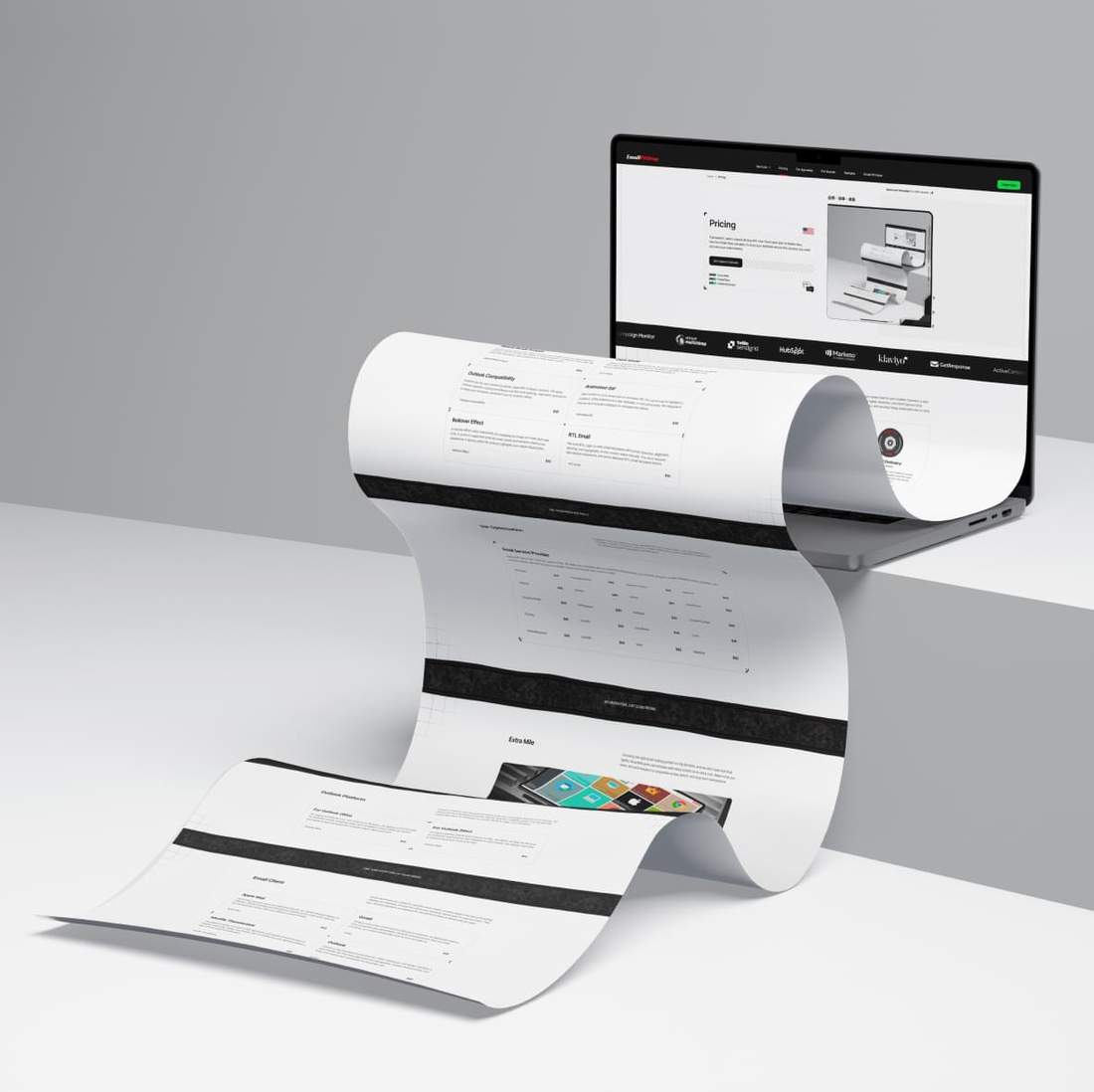


















Send us your design file and choose the speed that fits your schedule. Standard is best for planned campaigns, Express suits tighter deadlines, and ASAP Delivery is built for urgent launches. You set the pace, and we keep the process predictable and on track.
Ideal when you can plan ahead. Quality email coding and testing with a predictable turnaround.
Note: You will receive the completed email template within 48‑72 hours.
For tight deadlines when you still want time for a final review before sending. Quality email coding and testing with a faster turnaround.
Note: You will receive the completed email template within 8‑24 hours.
Best for urgent launches when timing is critical. Your order is handled as a top priority, with quality email coding and testing supported by extra production capacity: two email developers and a dedicated QA review.
Note: You will receive the completed email template within 2‑7 hours.
CLIENT-FRIENDLY PRICING WITH FIXED RATES
Layout is one of the first decisions in email development because it defines how the template will be built across devices. Most modern emails include a fully adapted mobile version. Some projects are exceptions, and we identify them early.
A responsive layout includes a mobile version of the email optimized for smaller screens. Content blocks can be reordered, spacing adjusted, and text styles refined for a clearer mobile experience and easier reading.
A fixed layout keeps the email at a fixed width and maintains the original desktop structure across devices. It is only partially mobile‑friendly, keeping the mobile view much closer to the original desktop design.
CHOOSE WHAT MATTERS AND CUSTOMIZE FOR YOUR GOALS
We've compiled the most-requested advanced options used in email production. Add the features your project needs to improve compatibility, presentation, and overall polish so your message looks better and performs more reliably across inboxes.

Retina Ready Images keep logos, photos, and visuals sharp on high-resolution screens. We use proven techniques for email images, so graphics stay crisp, file sizes stay optimized, and visuals remain clear when scaled.
Many recipients use dark mode, so it's worth optimizing for. We review rendering and apply adjustments to keep your template readable. Some variation may remain depending on how each email client handles it.
Outlook has its own rendering quirks, especially in legacy versions. We apply Outlook-specific coding techniques and fine-tune spacing, alignment, and layout to keep your template consistent across Outlook clients.
Add motion to your email with an animated GIF. It's a great way to highlight a product, draw attention to a key message, or add personality. We integrate it cleanly and include a fallback for unsupported clients.
A rollover effect adds interactivity by swapping an image on hover. Built with CSS, it works in supported desktop email clients and remains unobtrusive elsewhere. A strong option for product highlights and subtle visual polish.
We build RTL (right-to-left) email templates with correct direction, alignment, spacing, and typography so the content reads naturally. This work requires specialized experience, and we've delivered RTL email templates before.
SEE YOUR PRICE INSTANTLY
If needed, we can adapt your email template for your chosen ESP, such as Mailchimp, HubSpot, Klaviyo, or another platform. Code is adjusted to match platform requirements for clean integration and reliable performance.
Every ESP has its own rules for custom HTML. We align your template with the platform's requirements so it imports smoothly, remains editable where possible, and performs reliably. Rendering stays consistent across the inboxes your audience uses.
NO HIDDEN FEES, JUST CLEAR PRICING
Choosing the right email coding partner is a big decision, and we don't take that trust lightly. Extra Mile perks are included with every project at no extra cost. Select what you need, and we'll include it to streamline review, launch, and long-term maintenance.
Receive a short report with screenshots showing how your email renders across different email clients. Need specific inboxes included? Let us know, and we'll tailor the report to your needs.
We can handle minor content tweaks if you need last-minute changes before sending. This option also covers post-launch updates and helps keep your template reliable for future use, even a year later.
Clear HTML comments label key sections of your email template, making future edits faster and easier, even for non-technical team members. They also help your team navigate the code when updates are needed.
Image hosting may be needed depending on how your template will be used. We can host images temporarily while assets are moved to your server, or provide a permanent, ready-to-use setup.
Add a Google font to your template for supported email clients to give your design a polished, brand-aligned look. For clients that do not support web fonts, we include a reliable fallback.
If you selected ESP Optimization, we can import the template into your platform once it is ready. To do this, we will need temporary access to your account. Once the import is complete, we log out and remove our access.
3 Days + Responsive + Retina Ready + 50% off your first order.
A smart start for your next project.
Outlook templates are designed for teams that send campaigns directly from Outlook. We hand-code each template to handle Outlook-specific rendering quirks. You receive the correct file format for Windows or macOS, ready to open, edit, and send.
For teams sending directly from Outlook on Windows, we deliver an OFT file built for Outlook’s unique rendering rules. Each template is hand-coded, QA-tested, and ready to edit and send from Outlook Classic (Microsoft 365).
For teams sending directly from Outlook on Mac, we deliver an EMLTPL file built for Outlook’s requirements. Each template is hand-coded, QA-tested, and ready to edit and send from Outlook for Mac.
FINE TUNE EVERY PART OF YOUR ORDER
Email signatures are coded for specific email clients, so every detail, from layout to styling, displays as intended. Choose the client your signature will be built for and sent from. That way, the final signature is prepared for the platform where it will actually be used.
Apple Mail supports advanced signature layouts, so creative designs display as intended. Richer branding and background styling can be used, while spacing and typography remain clean and aligned in email threads.
Gmail is one of the most common inboxes for business, so signatures need to look consistent and dependable. We build branded blocks that hold their structure, so contact details stay easy to scan at a glance.
Thunderbird works well with HTML signatures and handles structured layouts reliably. Icons stay sharp, line breaks stay controlled, and your signature keeps a neat look as email threads grow.
Outlook is the toughest environment for HTML signatures, and design flexibility is more limited. We fine-tune alignment and typography, handle Outlook quirks, and keep your brand's look consistent for everyday use.
OPTIONS FOR AGENCIES AND BRANDS
Explore email templates and see how pricing is calculated. Each card shows delivery time, layout type, selected add-ons, and the final total. Use Inbox Preview to see how the template renders in major email clients and on mobile devices, and More Details for a short project summary. No matter the design style, reliable email coding keeps your message consistent across clients while keeping the experience on brand.

A cloud hosting campaign design converted into a clean, responsive HTML email ready for real inboxes. We preserved the original layout and visual details, coded it with email-safe HTML, optimized the images, and prepared the template for consistent rendering across desktop, mobile, and major email clients.

A shipment and onboarding design built into a responsive HTML email within three business days. Its dark visual style, tracking CTA, account setup steps, app download area, and video-linked sections were translated into email-safe code for reliable rendering across desktop, mobile, and major email clients.

Built from the supplied mobile app launch design, this responsive HTML email combines app store CTAs, feature cards, a testimonial, and quick-start steps. It was coded with email-safe HTML, Retina-ready assets, and Outlook compatibility for dependable rendering across major email clients and devices.

This business services email was completed within one business day and built to render consistently across major inboxes. Retina-ready visuals, pricing tables, service sections, and key calls to action were coded with email-safe HTML, with added Outlook support for consistent rendering across Outlook versions.
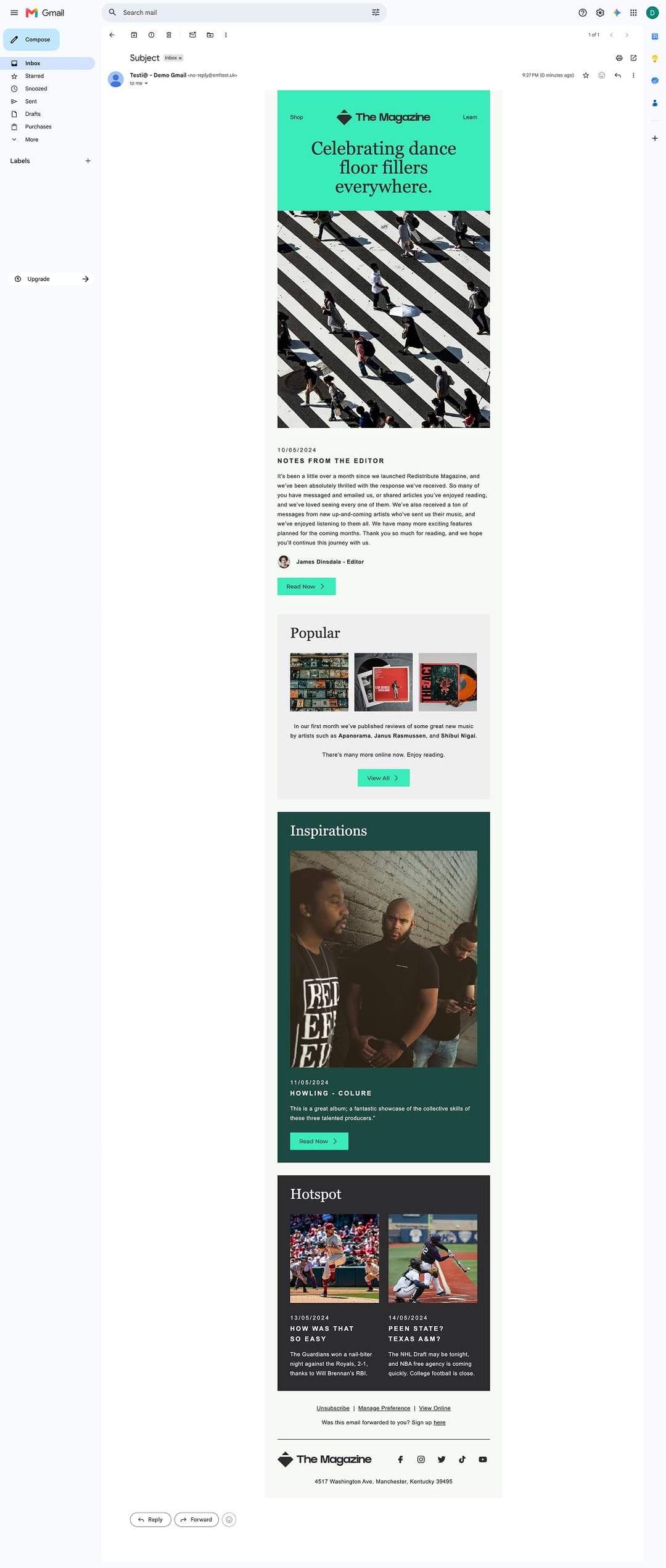
Prepared for HubSpot in one business day, this editorial newsletter combines a magazine-inspired layout with image-led stories, article sections, and clear CTAs. Retina-ready visuals and responsive, email-safe code help maintain the design’s hierarchy and readability across desktop, mobile, and major email clients.
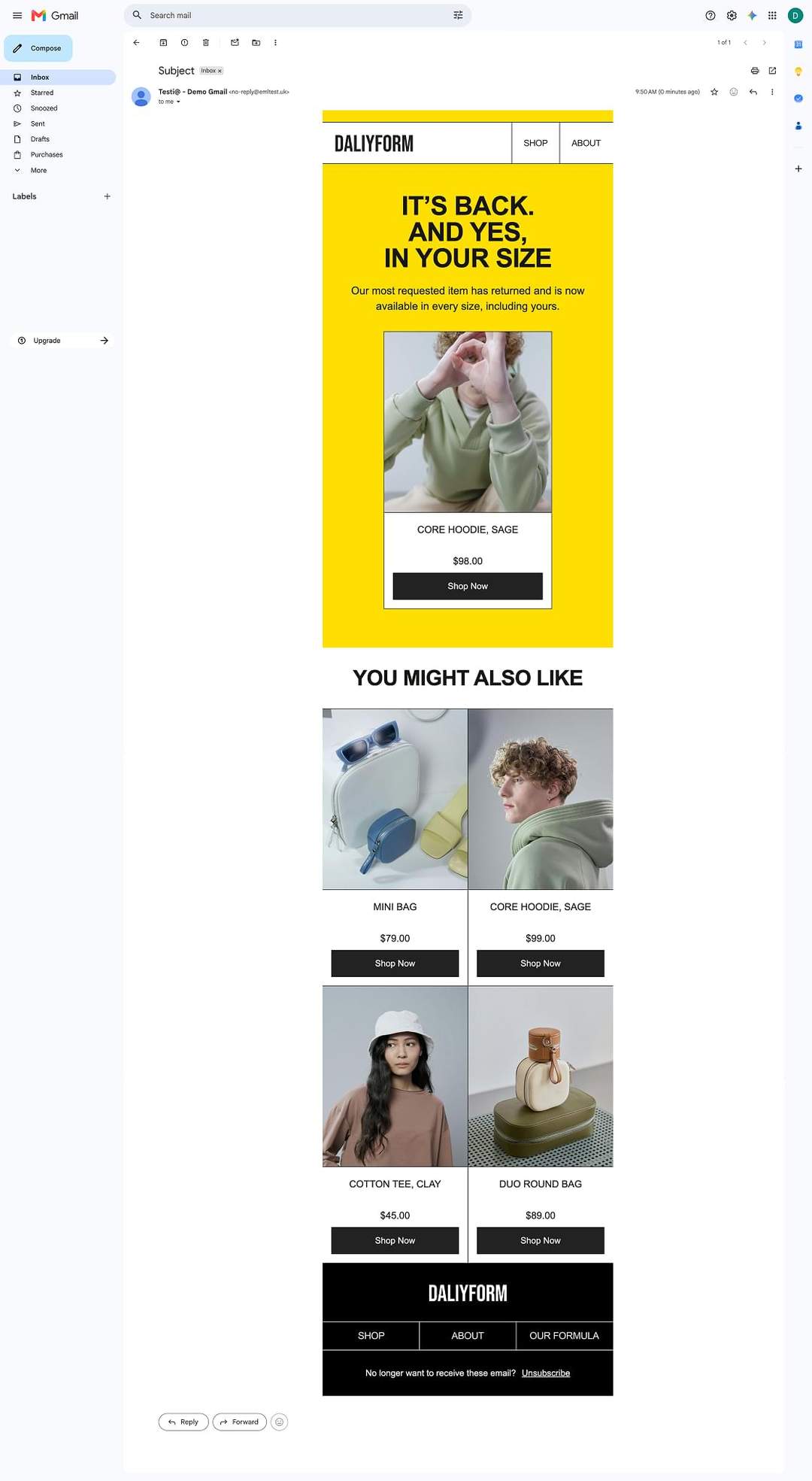
This product restock campaign was rebuilt as a responsive Mailchimp template within one business day. The hero offer, product grid, pricing, and shopping CTAs were recreated with email-safe HTML, while Retina-ready imagery and Dark Mode adjustments support dependable rendering across major inboxes.
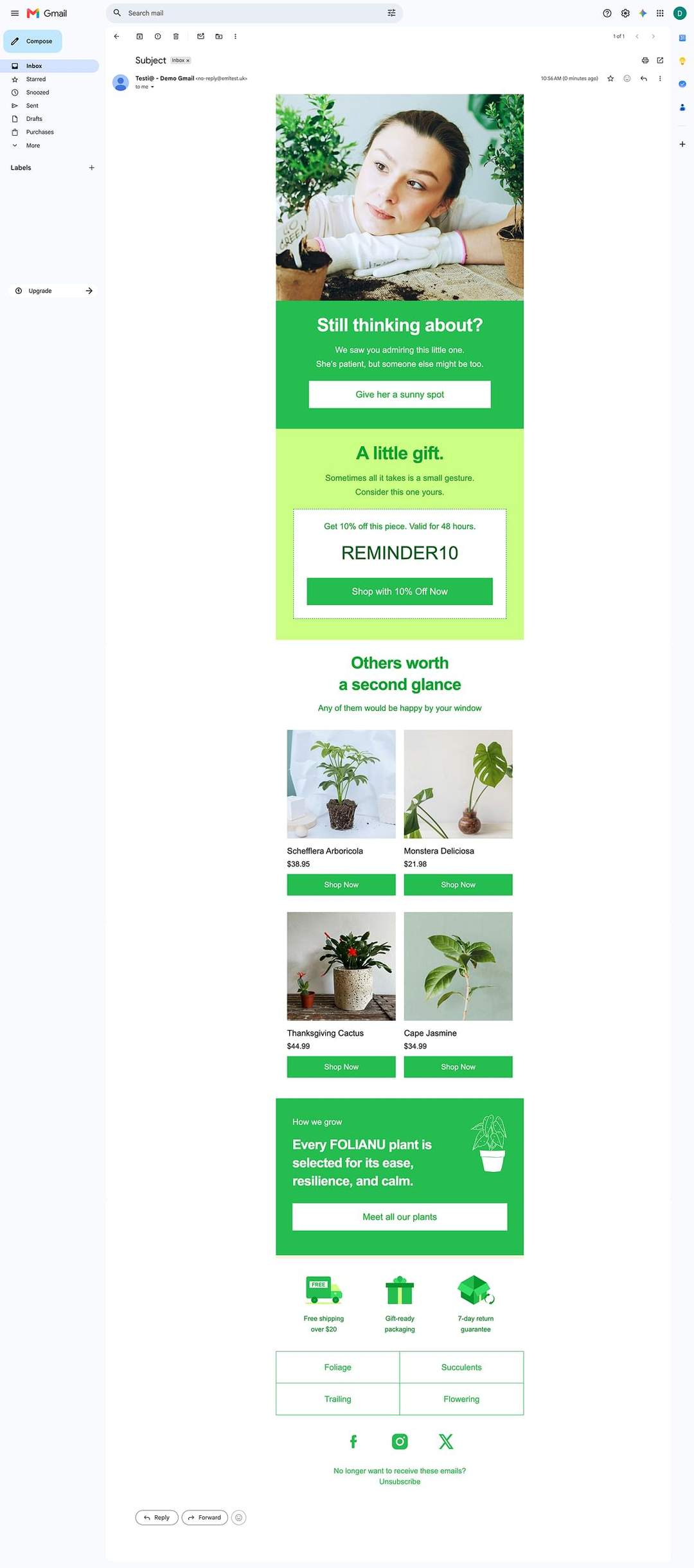
This plant retail abandoned cart email was designed to recover missed sales. It combines a limited-time discount, product recommendations, and clear shopping CTAs. The responsive, Retina-ready template was delivered through our ASAP service in just 5 hours and 30 minutes and prepared for consistent rendering across major inboxes.
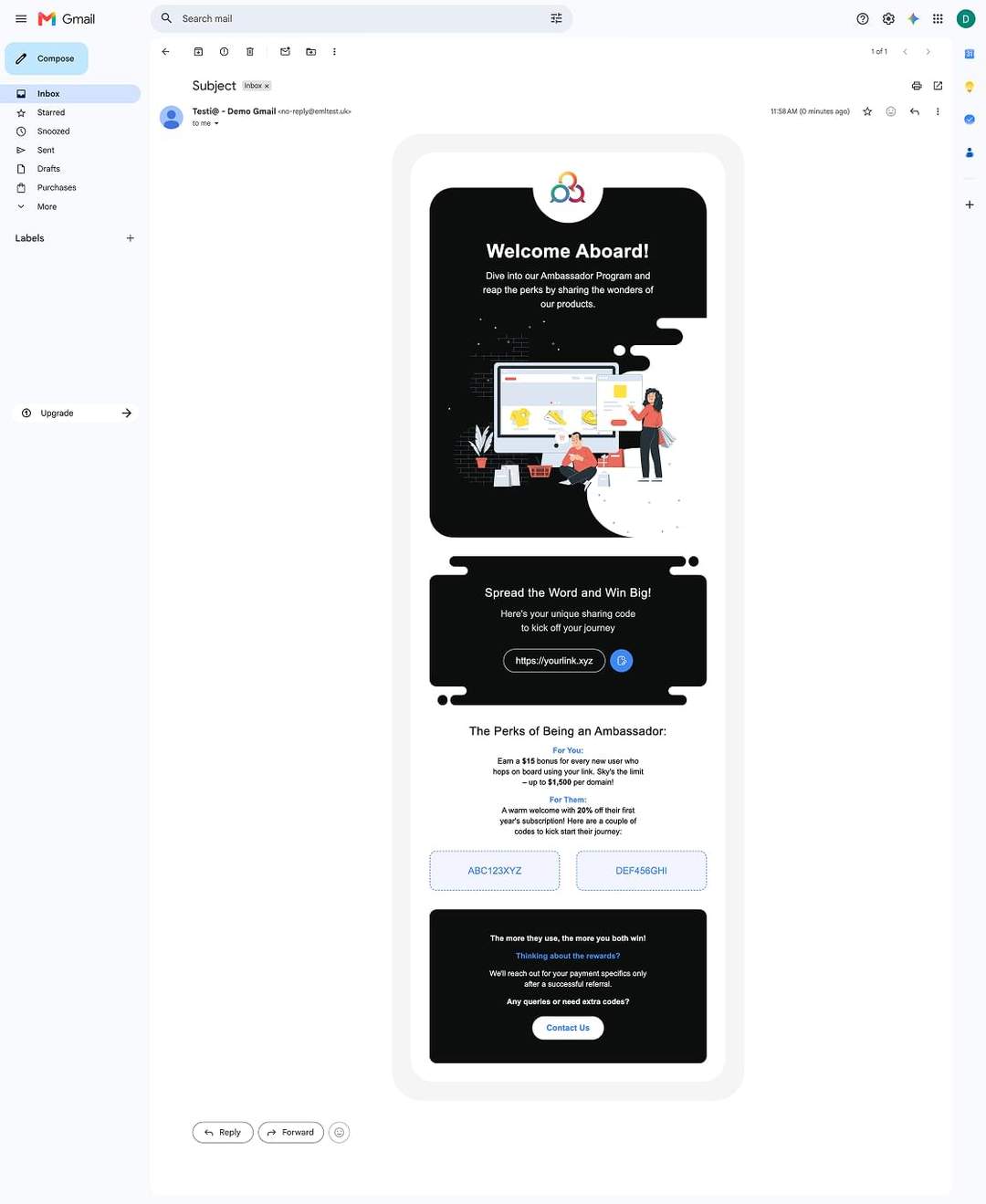
Built for an ambassador program, this responsive HubSpot email brings together a referral link, reward details, promo codes, and clear CTAs. Using Retina-ready assets and email-safe HTML, the template was delivered through our ASAP service in just 4 hours and 15 minutes, ready for import and launch in HubSpot.

Have questions before estimating your email project?
Browse the FAQ for clear answers on fixed pricing, delivery speeds, layout choices, advanced features, ESP optimization, free extras, and first‑order discounts.
Pricing is based on a clear set of fixed options. The final total depends on your chosen delivery time, layout type, and selected add‑ons. This makes it easy to build an estimate around your project and understand the full cost before you submit anything. It is especially helpful if you are quoting a client or acting as an intermediary, because you can see the expected cost upfront.
Choose the delivery option based on how urgent your project is. 3 Business Days is the best fit for planned campaigns, 1 Business Day works well for tighter deadlines, and ASAP Delivery is for last‑minute requests that need top‑priority handling, with delivery in 2 to 7 hours. The faster the turnaround, the higher the price, so the right choice comes down to the balance you want between speed and budget.
Choose responsive layout if you want the email to adapt for smaller screens and provide a better mobile reading experience. It allows content blocks to stack or adjust, spacing to be refined, and the layout to feel more natural on phones. In most cases, responsive layout is the preferred option. Fixed layout is usually chosen only when the project specifically requires that kind of structure.
Yes. You can order a simple email template without most advanced features. Retina Ready Images are a recommended option because high‑density screens are now standard across modern smartphones, and sharp visuals have become a practical necessity. The other advanced options can be skipped if you know your audience well and are confident they are not needed for your specific project.
The most worthwhile advanced features are the ones that directly improve how your email is viewed and experienced. In many cases, Retina Ready Images, Dark Mode, and Outlook Compatibility are the most practical choices because they help the template look sharper, stay more readable, and render more consistently across different inbox conditions. Other options are worth adding when the design, audience, or campaign format specifically calls for them.
ESP optimization is worth adding if you plan to import the template into an email platform and want it prepared for that platform’s requirements. It helps the HTML import more smoothly, remain editable where possible, and perform more reliably once inside the ESP. If you are sending through Mailchimp, HubSpot, Klaviyo, or another platform, this option helps make the handoff cleaner and more practical for real use.
You can add the Extra Mile options shown on the page at no extra cost, including Preview Report, Extended Support, HTML Comments, Image Hosting, Google Fonts, and Template Import. Select the free options that are useful for your project, and we will include them in the final setup. ESP Optimization is also currently offered free of charge if your template needs to be prepared for a specific platform.
On the Order Now page, the final price updates instantly as you select options, so you can see the total change in real time. The “Need help choosing?” section can also apply recommended options based on your priorities and update the summary automatically. If you want to start over, the Reset Options button returns the page to its default setup.
The calculator gives you a clear instant estimate based on the options you select. Every request is still reviewed before coding begins to make sure the setup matches the actual project. If anything needs adjustment, we will explain it clearly and confirm the updated scope with you before development starts.
You can save 50% on your first HTML Email Template or Outlook Template. The exact discount depends on the options selected for your order and is shown directly in the Order Summary before you approve the start. The more advanced the setup, the higher the discount amount, because the 50% discount adjusts automatically with your selected options.
Tell us what you have and what you need. We'll help shape your order so you can move forward with confidence.




